The digital landscape, while offering unprecedented connectivity, has also brought with it the persistent annoyance of spam calls. For years, iPhone users have sought a more robust solution to filter out unwanted solicitations and focus on the conversations that truly matter. With the upcoming release of iOS 26, Apple is finally delivering on this front, introducing intelligent Call Screening features that promise to significantly reduce the influx of spam calls. But that’s not all – iOS 26 also addresses another common frustration: forgetting to return important missed calls, with a new, integrated Callback Reminder system. Let’s dive into the details of these game-changing updates.
Finally Saying Goodbye to Spam Calls with Intelligent Call Screening
The battle against spam calls is about to get a major upgrade. iOS 26 introduces a suite of Call Screening features designed to empower users to take control of who gets through to them. Here’s a breakdown of the key functionalities:
1. “Ask Reason for Calling”: The Intelligent Interceptor
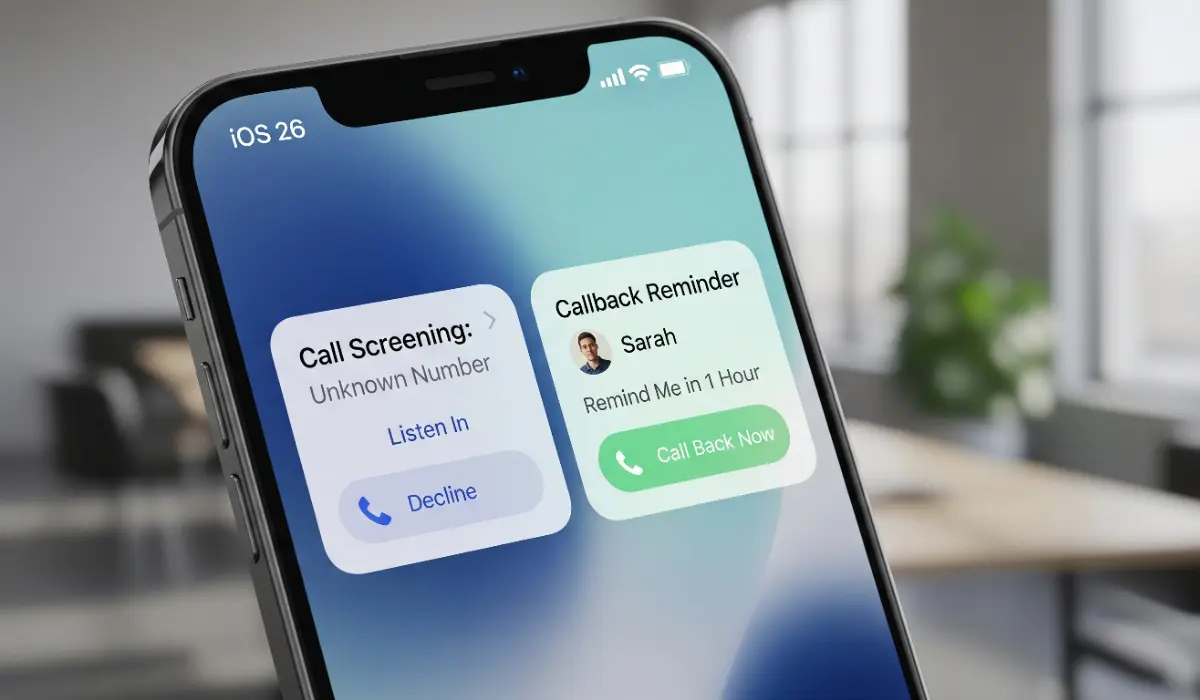
Imagine a world where unknown callers have to state their purpose before your phone even rings. That’s the reality iOS 26 is bringing with the new “Ask Reason for Calling” feature. When enabled, calls from numbers not saved in your contacts will be automatically intercepted. The caller will be prompted by a system voice to state their name and the reason for their call.
Crucially, you, the recipient, will receive a real-time text transcript of their response on your phone screen. This allows you to quickly assess the legitimacy and urgency of the call without ever having to answer it blindly. Based on the transcript, you can choose to:
- Answer the call: If the reason seems valid or important.
- Send to voicemail: If it’s a vague or suspicious request.
- Silence and ignore: If it’s clearly a spam attempt.
This feature leverages on-device intelligence to manage the initial interaction, giving you the power to filter out unwanted calls effectively.
also read: Apple Drops iOS 26 Beta & iOS 18.6 Update: What’s New, Who Gets It, and Why It Matters
2. Enhanced “Silence Unknown Callers”
The existing “Silence Unknown Callers” feature gets a refinement in iOS 26. Located under Settings > Phone > Silence Unknown Callers, this option now works in tandem with the new Call Screening capabilities. When enabled, calls from unsaved numbers will still be silenced and directed to voicemail. However, with “Ask Reason for Calling” active, you’ll still receive the transcript of their explanation in your voicemail, providing more context than just a silent notification.
3. Smarter Call Filtering and Organization
Keeping your call history clean and organized is now easier than ever. iOS 26 introduces improved call filtering that automatically moves missed calls and voicemails from unknown numbers to a dedicated “Unknown Callers” list within the Recents tab of your Phone app. This separation ensures that your primary call log remains focused on known contacts.
Furthermore, a new toggle within the Phone settings allows you to automatically silence calls that have been identified as potential spam by your mobile carrier. This proactive approach adds another layer of defense against unwanted interruptions.
4. Streamlined Spam Reporting from Voicemail
Dealing with spam voicemails is now more efficient. When listening to a voicemail from an unknown number, you’ll find a prominent “Report Spam” button. Tapping this sends the voicemail data to Apple for analysis, helping to improve the accuracy of spam detection in the future. You’ll have the option to report and keep the voicemail or report and delete it directly from the interface.
Configuring Call Screening in iOS 26
Managing your Call Screening preferences is straightforward. Navigate to Settings > Phone > Screen Unknown Callers. Here, you’ll find three primary options:
- Never: Calls from all numbers will ring as usual.
- Ask Reason for Calling: Enables the intelligent call interception and transcript feature.
- Silence: All calls from unsaved numbers will be silenced and sent to voicemail (while still potentially capturing the reason for calling if that sub-feature is also enabled).
You can customize these settings based on your individual needs and preferences, allowing for a personalized approach to managing incoming calls.
Introducing the Integrated Callback Reminder
In today’s fast-paced world, it’s easy to miss returning an important call amidst a flurry of notifications and tasks. iOS 26 addresses this with a convenient and seamlessly integrated Callback Reminder system directly within the Phone app.
Effortless Reminder Creation
Setting a callback reminder is designed to be quick and intuitive:
- Open the Phone app.
- Tap the Calls tab, then navigate to Recents.
- Swipe left across the missed call you want to follow up on.
- Tap the new blue clock icon that appears.
- Choose from a range of pre-set reminder options, such as:
- Remind Me in 1 hour
- Remind Me Tonight
- Remind Me Tomorrow
- Remind Me Later (allows you to set a custom date and time)
Seamless Integration with the Reminders App
The callback reminders you set within the Phone app are seamlessly integrated with Apple’s native Reminders application. This means:
- Centralized Management: All your callback reminders will appear alongside your other tasks in the Reminders app.
- Contextual Information: Each callback reminder will include the contact’s name, phone number, and any additional notes you might have added.
- Direct Call Initiation: When a callback reminder notification appears, you can simply tap the integrated phone icon to initiate the call directly, saving you time and effort.
This tight integration ensures that you have a centralized system for managing all your important follow-ups, reducing the chances of missed opportunities or forgotten conversations.
A Significant Step Forward for iPhone Communication
iOS 26 represents a significant leap forward in how iPhone users manage their communication. The intelligent Call Screening features offer a much-needed solution to the persistent problem of spam calls, providing users with greater control and peace of mind. The new Callback Reminder system addresses a common everyday frustration, ensuring that important missed calls are never forgotten.
These updates, expected to be released to compatible iPhones this fall, promise to enhance the overall user experience, making the iPhone’s Phone app a more powerful and efficient communication tool. By taking a proactive stance against spam and streamlining the process of following up on missed calls, iOS 26 is set to be a welcome and impactful update for iPhone users worldwide.